
×
Üye Girişi
ESP8266 NodeMCU Hızlı Link (GET Parametreli) 4'lü LED Kontrolü
ESP8266 NodeMCU Hızlı Link (GET Parametreli) 4'lü LED Kontrolü
Bu yöntemde sayfa yönlendirmesi (redirect) yapılmaz. Doğrudan tarayıcı adres çubuğuna yazılacak URL parametreleri (örneğin http://192.168.1.50/led?no=1&durum=1) veya arayüzdeki butonlar aracılığıyla LED'ler anında tetiklenir. Böylece hem web arayüzünden hem de tarayıcı üzerinden direkt linkle veya cURL, Tasker, Home Assistant gibi dış otomasyon sistemlerinden kolayca kontrol edilebilir.
Kullanılabilecek Direkt Link Örnekleri:
http://[IP-ADRESINIZ]/led?no=1&durum=1→ 1. LED'i AÇhttp://[IP-ADRESINIZ]/led?no=1&durum=0→ 1. LED'i KAPAThttp://[IP-ADRESINIZ]/hepsi?durum=1→ Tüm LED'leri AÇhttp://[IP-ADRESINIZ]/hepsi?durum=0→ Tüm LED'leri KAPAT
Devre Bağlantı Şeması
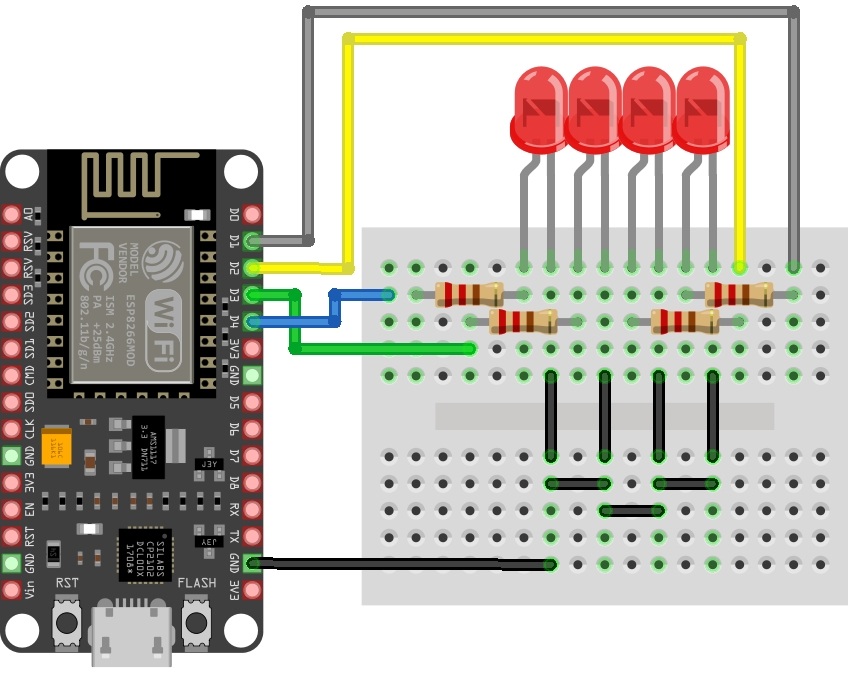
Görseldeki breadboard devresine göre pin bağlantıları şu şekildedir:
- 1. LED (Soldaki): Anot (+) bacağı direnç üzerinden D1 (GPIO5) pinine.
- 2. LED: Anot (+) bacağı direnç üzerinden D2 (GPIO4) pinine.
- 3. LED: Anot (+) bacağı direnç üzerinden D3 (GPIO0) pinine.
- 4. LED (Sağdaki): Anot (+) bacağı direnç üzerinden D4 (GPIO2) pinine.
- Katot (-) Bacakları: Tüm LED'lerin eksi bacakları breadboard üzerindeki ortak eksi (GND) hattına bağlanır ve NodeMCU üzerindeki GND pini ile birleştirilir.
Önemli İpucu (Boot Pin Uyarısı):
ESP8266 mimarisinde D3 (GPIO0) ve D4 (GPIO2) pinleri kartın ilk açılış (boot) modunu belirler. Kodu yüklerken veya kart yeniden başlatılırken sorun yaşamamak için devre bağlantılarınızın sağlam olduğundan ve koruma dirençlerinin bağlandığından emin olun.
ESP8266 mimarisinde D3 (GPIO0) ve D4 (GPIO2) pinleri kartın ilk açılış (boot) modunu belirler. Kodu yüklerken veya kart yeniden başlatılırken sorun yaşamamak için devre bağlantılarınızın sağlam olduğundan ve koruma dirençlerinin bağlandığından emin olun.
Örnek Arduino IDE Kodu
Aşağıdaki kod, gelen URL parametrelerini (no ve durum) ayrıştırarak pini doğrudan tetikler. Kendi Wi-Fi ağ bilgilerinizi girdikten sonra NodeMCU'ya yükleyebilirsiniz:
// ESP8266 NodeMCU Direkt Link / URL Parametreli LED Kontrol Kodu
#include <ESP8266WiFi.h>
#include <ESP8266WebServer.h>
// Wi-Fi Ağ Bilgileriniz
const char* ssid = "YENIDIR_WIFI";
const char* password = "WIFI_SIFRENIZ";
// Web Sunucu Nesnesi (Port 80)
ESP8266WebServer server(80);
// LED Pinleri
const int leds[] = {D1, D2, D3, D4};
bool ledStates[] = {false, false, false, false};
// Ana Web Sayfası Arayüzü
void handleRoot() {
String html = "<!DOCTYPE html><html lang='tr'><head><meta charset='UTF-8'>";
html += "<meta name='viewport' content='width=device-width, initial-scale=1.0'>";
html += "<title>YENIDIR - Direkt Link LED Kontrol</title>";
html += "<style>";
html += "body { font-family: Arial, sans-serif; text-align: center; background-color: #f4f4f9; margin-top: 30px; }";
html += "h1 { color: #333; }";
html += ".card { background: white; max-width: 450px; margin: 0 auto; padding: 20px; border-radius: 10px; box-shadow: 0 4px 8px rgba(0,0,0,0.1); }";
html += ".btn { display: inline-block; padding: 10px 18px; margin: 5px; font-size: 14px; border: none; border-radius: 5px; cursor: pointer; text-decoration: none; color: white; font-weight: bold; }";
html += ".btn-on { background-color: #28a745; }";
html += ".btn-off { background-color: #dc3545; }";
html += ".btn-main { background-color: #007bff; width: 80%; margin-top: 10px; }";
html += "</style></head><body>";
html += "<div class='card'>";
html += "<h1>Direkt Link LED Kontrol</h1>";
html += "<p>YENIDIR.COM Web Server</p><hr>";
for (int i = 0; i < 4; i++) {
html += "<p><strong>LED " + String(i + 1) + " (D" + String(i + 1) + "):</strong> " + String(ledStates[i] ? "<span style='color:green;'>AÇIK</span>" : "<span style='color:red;'>KAPALI</span>") + "</p>";
html += "<a class='btn btn-on' href='/led?no=" + String(i + 1) + "&durum=1'>AÇ</a>";
html += "<a class='btn btn-off' href='/led?no=" + String(i + 1) + "&durum=0'>KAPAT</a><hr>";
}
// Toplu Kontrol Butonları
html += "<a class='btn btn-main' href='/hepsi?durum=1'>TÜMÜNÜ AÇ</a><br>";
html += "<a class='btn btn-main' style='background-color:#6c757d;' href='/hepsi?durum=0'>TÜMÜNÜ KAPAT</a>";
html += "</div></body></html>";
server.send(200, "text/html", html);
}
// Tekli LED Kontrolü (/led?no=1&durum=1)
void handleLedParam() {
if (server.hasArg("no") && server.hasArg("durum")) {
int ledNo = server.arg("no").toInt() - 1; // 0 tabanlı indexe çevir
int durum = server.arg("durum").toInt();
if (ledNo >= 0 && ledNo < 4) {
ledStates[ledNo] = (durum == 1);
digitalWrite(leds[ledNo], ledStates[ledNo] ? HIGH : LOW);
}
}
handleRoot(); // Güncel durumu sayfada göster
}
// Tüm LED'leri Birden Kontrol Etme (/hepsi?durum=1)
void handleAllParam() {
if (server.hasArg("durum")) {
int durum = server.arg("durum").toInt();
for (int i = 0; i < 4; i++) {
ledStates[i] = (durum == 1);
digitalWrite(leds[i], ledStates[i] ? HIGH : LOW);
}
}
handleRoot();
}
void setup() {
Serial.begin(115200);
// Pin Yönlendirmeleri
for (int i = 0; i < 4; i++) {
pinMode(leds[i], OUTPUT);
digitalWrite(leds[i], LOW);
}
// Wi-Fi Bağlantısı
Serial.println();
Serial.print("Wi-Fi Agina Baglaniliyor: ");
Serial.println(ssid);
WiFi.begin(ssid, password);
while (WiFi.status() != WL_CONNECTED) {
delay(500);
Serial.print(".");
}
Serial.println("\nWi-Fi Baglantisi Saglandi!");
Serial.print("Web Server IP Adresi: ");
Serial.println(WiFi.localIP());
// URL Yönlendirmeleri
server.on("/", handleRoot);
server.on("/led", handleLedParam); // Parametreli yönlendirme
server.on("/hepsi", handleAllParam); // Toplu parametreli yönlendirme
server.begin();
Serial.println("HTTP Sunucusu Baslatildi.");
}
void loop() {
// Gelen HTTP isteklerini sürekli dinle
server.handleClient();
}
Nasıl Kullanılır?
- 1. Bağlantı Kurma: Cihazınızı ESP8266'nın bağlı olduğu Wi-Fi ağına bağlayın.
- 2. IP Adresine Giriş: Seri Port Ekranından aldığınız IP adresiyle tarayıcı üzerinden arayüze erişebilirsiniz.
-
3. Direkt Link ile Tetikleme: Sayfadaki butonlara tıklayabileceğiniz gibi, tarayıcı adres çubuğuna doğrudan
http://192.168.1.50/led?no=2&durum=1yazarak da ilgili LED'i anında yakabilirsiniz.
Kullanım Avantajı
- Dış Sistem Entegrasyonu: Bu yapı sayesinde tarayıcıya girmeden, Python betiklerinden, cURL komutlarından veya Tasker / Home Assistant gibi akıllı ev uygulamalarından HTTP GET isteği atarak LED'leri doğrudan tetikleyebilirsiniz. Akıllı ev otomasyonu için uygundur.
💬 Yorumlar
Henüz yorum yapılmamış. İlk yorumu siz yapın!